
scrapy实现登录有两种思路:
1. 直接携带cookie登录;
应用场景:
(1)cookie过期时间很长,常见于一些不规范的网站
(2)能在cookie过期之前把所有的数据拿到
(3)配合其他程序使用,比如其使用selenium把登陆之后的cookie获取到保存到本地,scrapy发送请求之前先读取本地cookie
<br/>
2. 找到登录的url,发送post请求存储cookie;
例:登录github
<br/>
**1. 直接携带cookie登录**
(1)创建爬虫项目
```shell
> scrapy startproject git
> cd git
> scrapy genspider git1 github.com
```
<br/>
(2)配置`settings.py`
```python
# Crawl responsibly by identifying yourself (and your website) on the user-agent
USER_AGENT = 'Mozilla/5.0 (Windows NT 10.0; Win64; x64) AppleWebKit/537.36 (KHTML, like Gecko) Chrome/89.0.4389.90 Safari/537.36'
# Obey robots.txt rules
ROBOTSTXT_OBEY = False
```
<br/>
(3)先手动登录到github,复制cookie
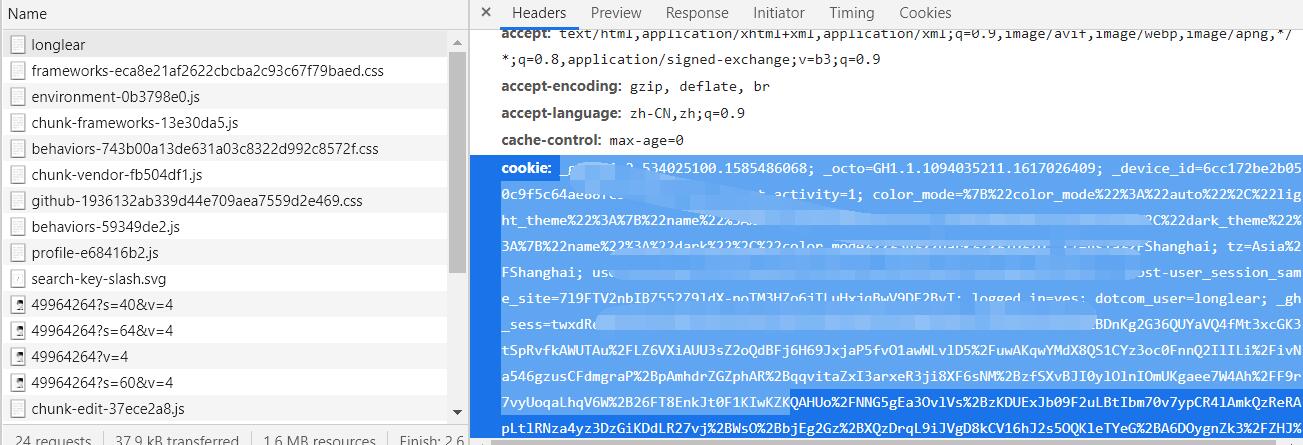
<br/>
(4)重写 `start_requests` 方法
```python
import scrapy
class Git1Spider(scrapy.Spider):
name = 'git1'
allowed_domains = ['github.com']
# 注意:请求的url应该是 https://github.com/你的github用户名
start_urls = ['https://github.com/你的github用户名']
def parse(self, response):
# 登录前github上的title是 GitHub . GitHub
# 登录成功后为 用户名 . GitHub
# 输出 用户名 · GitHub,说明登录成功
print(response.xpath('/html/head/title/text()').extract_first()))
pass
def start_requests(self):
"""
重写该方法
"""
url = self.start_urls[0]
cookie = '_ga=GA1.2.534025100(cookie太长了这里省略不写了)...3D'
# 1. 将cookie转换为字典
cookies = {data.split('=')[0]: data.split('=')[-1] for data in cookie.split(';')}
# 2. 携带cookies发送请求
yield scrapy.Request(
url=url,
callback=self.parse,
cookies=cookies
)
```
<br/>
**2. 找到的url,携带相关参数发送post请求**
其分析过程这里就省略了,下面只提供了scrapy中用于发送 POST 请求的代码。
```python
import scrapy
class Git2Spider(scrapy.Spider):
name = 'git2'
allowed_domains = ['github.com']
start_urls = ['http://github.com/login']
def parse(self, response):
# 1. 解析出登录需要的所有参数
post_data = {}
# 2. 找到登录的url,提交请求
# 发送 POST请求可以调用scrapy.FormRequest
# 或者 scrapy.Request(url, method='POST')
yield scrapy.FormRequest(
url='https://github.com/session', # github提交表单的地址
callback=self.login_github, # 登录成功后的解析函数
formdata=post_data # 进行登录时所需要的参数
)
pass
```
- 爬虫基本概念
- 爬虫介绍
- 通用爬虫与聚焦爬虫
- 通用爬虫
- 聚焦爬虫
- HTTP与HTTPS协议
- HTTP协议简介
- HTTP的请求与响应
- 客户端HTTP请求
- 服务端HTTP响应
- requests库
- requests库简介
- requests简单使用
- 发送带header的请求
- 发送带参数的请求
- 案例:下载百度贴吧页面
- 发送POST请求
- 使用代理
- 为什么要使用代理?
- 正反向代理
- 代理服务器分类
- 使用代理
- cookie和session
- cookie和session的区别
- 爬虫处理cookie和session
- 使用session登录网站
- 使用cookie登录网站
- cookiejar
- 超时和重试
- verify参数忽略CA证书
- URL地址的解码和编码
- 数据处理
- json数据处理
- json数据处理方案
- json模块处理json数据
- jsonpath处理json数据
- 正则表达式
- lxml
- xpath与lxml介绍
- xpathhelper插件
- 案例
- Beautiful Soup
- Beautiful Soup介绍
- 解析器
- CSS选择器
- 案例
- 四大对象
- 爬虫与反爬虫
- 爬虫与反爬虫的斗争
- 服务器反爬的原因
- 什么样的爬虫会被反爬
- 反爬领域常见概念
- 反爬的三个方向
- 基于身份识别进行反爬
- 基于爬虫行为进行反爬
- 基于数据加密进行反爬
- js解析
- chrome浏览器使用
- 定位js
- 设置断点
- js2py
- hashlib
- 有道翻译案例
- 动态爬取HTML
- 动态HTML
- 获取Ajax数据的方式
- selenium+driver
- driver定位
- 表单元素操作
- 行为链
- cookie操作
- 页面等待
- 多窗口与页面切换
- 配置对象
- 拉勾网案例
- 图片验证码识别
- 图形验证码识别技术简介
- Tesseract
- pytesseract处理图形验证码
- 打码平台
- 登录打码平台
- 验证码种类
- 多任务-线程
- 继承Thread创建线程
- 查看线程数量
- 资源共享
- 互斥锁
- 死锁
- 避免死锁
- Queue线程
- 多线程爬虫
- 多任务-进程
- 创建进程
- 进程池
- 进程间的通信
- Python GIL
- scrapy框架
- scrapy是什么?
- scrapy爬虫流程
- 创建scrapy项目
- Selector选择器
- logging
- scrapy shell
- 保存数据
- Item数据建模
- 翻页请求
- Request
- CrawlSpider
- settings
- 模拟登录
- 保存文件
- 内置Pipeline
- 自定义Pipeline
- 中间件
- selenium动态加载
- 防止反爬
- 随机User-Agent
- 随机IP代理
- settings中的参数
- 随机延迟
- request.meta常用参数
- 分布式爬虫
- 分布式原理
- scrapy_redis
- 去重问题
- 分布式爬虫编写流程
- CrawSpider改写成分布式
- scrapy_splash
- scrapy_splash是什么?
- scrapy_splash环境搭建
- APP抓取
- Android模拟器
- appium
- appium是什么?
- appium环境搭建
- appium环境联调测试
- appium的使用
- 演示项目-抓取抖音app
- 抖音app与appium的联调测试
- 元素定位
- 抖音appium代码
- 抓包软件
- url去重处理